
Are You Really Hidden? (Live Proof)
We’ve all been there. Whether you are checking out sensitive medical symptoms, banking details, or visiting adult websites, there is a universal instinct to hit Ctrl+Shift+N and open an Incognito tab. You assume you've put on a digital invisibility cloak.
But have you?
To find out what actually happens behind the scenes, we ran a live technical experiment. We configured a website behind Cloudflare (the network infrastructure powering over 20% of the entire internet, including most major adult and streaming websites) and analyzed the raw server logs. We tested five different browsing setups—ranging from standard browsing to full-scale VPN and Incognito combinations.
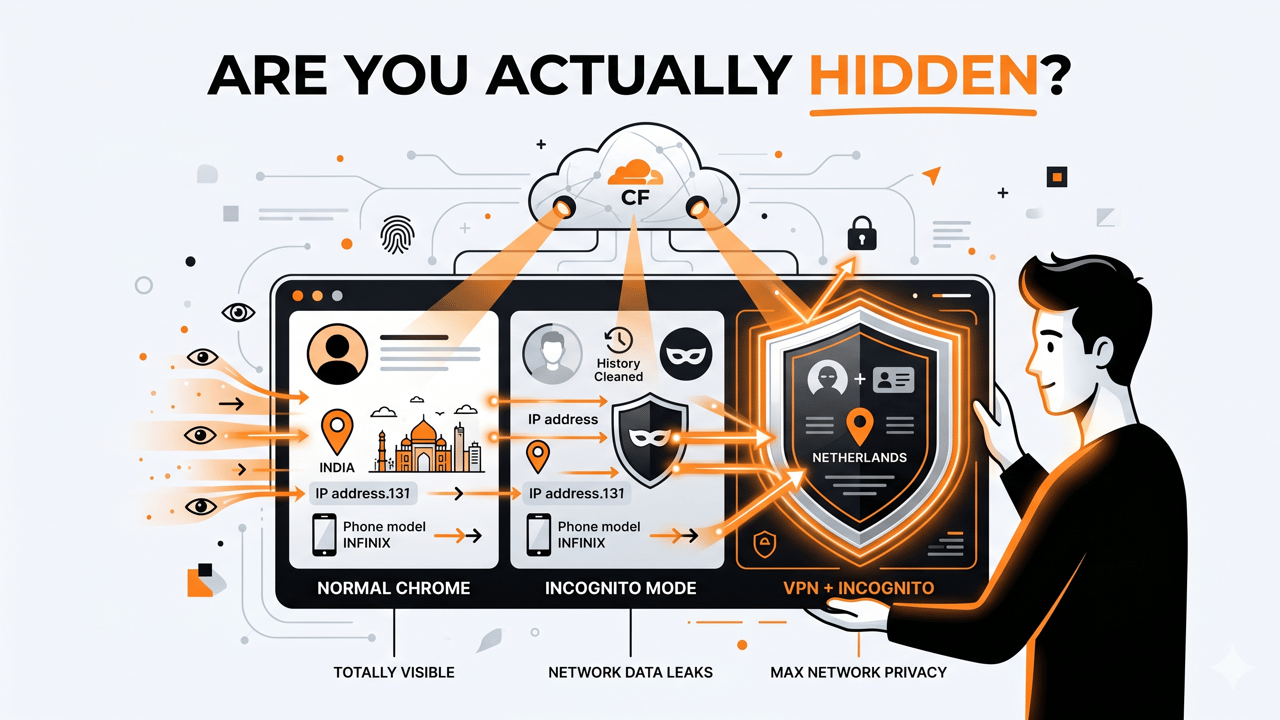
The results were eye-opening. Here is the raw, unvarnished truth of what website owners can see about you.
The 5-Step Privacy Experiment: What Our Logs Revealed
When you visit a website protected by Cloudflare, your request passes through an edge server before reaching the website owner. Cloudflare automatically appends highly granular data packets to that request.
Here is exactly what our live logs captured across 5 different real-world testing scenarios:
1. Normal Chrome Mode
- What we saw: Everything. Our logs instantly captured the user's exact residential IP address, internet service provider (Reliance Jio), precise location (Kanpur, India), and browser cookies.
- The Shocking Part: Through "Client Hints" (
sec-ch-ua), the browser openly broadcasted the exact physical device model being used (Infinix X669C) and the exact operating system version.
2. Incognito Chrome Mode
- What we saw: Your location and network identity are completely exposed.
- The Reality Check: While Incognito successfully stripped away saved cookies and hidden tracking profiles, it did absolutely nothing to hide network data. The logs still clearly showed the exact residential IP address, the ISP, and the physical city location (Kanpur).
3. Incognito + Cloudflare WARP
- What we saw: A masked ISP, but localized positioning.
- The Reality Check: Turning on Cloudflare WARP shifts the organization name from your local ISP to Cloudflare London, LLC. It effectively hides your specific residential IP. However, because WARP routes traffic efficiently to the nearest local edge server, the location shifted only slightly to a nearby regional hub (Lucknow, India), keeping the user in the same geographical territory.
4. VPN Chrome Mode (No Incognito)
- What we saw: A bizarre, compromised mix of a European identity paired with local device tracks.
- The Reality Check: With a VPN active, our logs reported the location as Rotterdam, Netherlands, routing through an enterprise hosting provider (WorldStream B.V.). However, because the user was not in Incognito mode, the browser still proudly handed over existing tracking cookies and granular hardware specifications (Infinix X669C) to our server logs.
5. VPN + Incognito Chrome Mode
- What we saw: The maximum level of standard consumer privacy.
- The Reality Check: By combining both tools, the session effectively anonymized both sides of the coin. The VPN masked the IP, ISP, and location (showing Netherlands), while Incognito stripped away the tracking cookies and detailed hardware identifiers.
Also Read: What Are Signs My iPhone Is Hacked?
Live Practical Proof: Side-by-Side Comparison
Based directly on the data captured in our live Cloudflare Worker testing environment, here is how the data changes depending on how you browse:
| Tracking Parameter | Normal Chrome | Incognito Chrome | Incognito + Cloudflare WARP | VPN Chrome | VPN + Incognito Chrome |
|---|---|---|---|---|---|
| IP Address | Real IP Exposed | Real IP Exposed | Masked (Cloudflare IP) | Masked (VPN IP) | Masked (VPN IP) |
| ISP / Organization | Real ISP (e.g., Jio) | Real ISP (e.g., Jio) | Cloudflare LLC | VPN Host (e.g., WorldStream) | VPN Host (e.g., WorldStream) |
| Country / City | Real Location (Kanpur) | Real Location (Kanpur) | Nearest Node (Lucknow) | VPN Location (Rotterdam) | VPN Location (Rotterdam) |
| Device Model | Infinix X669C | Infinix X669C | Generic Android | Infinix X669C | Generic Android |
| Tracking Cookies | Active/Exposed | Blocked/Clean | Blocked/Clean | Active/Exposed | Blocked/Clean |
| Connection Protocol | HTTP/3 | HTTP/3 | HTTP/2 | HTTP/3 | HTTP/3 |
Beyond Cloudflare: What Else Can Website Owners Track Without Your Permission?
The server logs shown above are just what a website gets automatically at the network layer. If a website owner wants to dig deeper—even if you are using a VPN and Incognito—they can deploy advanced client-side scripts to harvest an astonishing amount of data without your explicit permission.
1. Browser Fingerprinting (The Ultimate Tracking Weapon)
Even if you don't have cookies, your browser has a unique configuration profile. Advanced scripts can query your browser for a list of installed system fonts, screen resolution, color depth, and active browser extensions. This creates a "fingerprint" so distinct that it can track you across the web with over 90% accuracy, rendering Incognito completely useless.
2. Canvas & WebGL Rendering
Websites can quietly ask your browser to render a hidden 2D graphic (Canvas) or a 3D image (WebGL) in the background. Because every smartphone and computer hardware chipset has minuscule differences in micro-architecture and drivers, the resulting image is rendered with microscopic variations. This hardware signature is entirely immune to VPN changes.
3. Detailed Behavioral Tracking
Using tools like Hotjar or custom JavaScript, website owners can record:
- Every single mouse movement, hover path, and click location.
- How fast or slow you scroll through content.
- Exactly how long you pause on a specific section or image.
4. Device Status Indicators
Websites can tap into minor browser APIs to check your device's live battery status (e.g., 74% battery, discharging) and charging state. When combined with other data points, this serves as an easy short-term session identifier to link your "anonymous" tab back to your real identity.
Also Read: how ai is changing daily life
The Bottom Line
Incognito mode does not protect your privacy across the network; it simply cleans up your local history so someone looking at your physical device won’t see what you did. Conversely, a VPN changes your network location but leaves your browser's unique configuration wide open to identification.
If you want the baseline standard of privacy from automated network logging, you must use a high-quality VPN combined with an Incognito session. But remember: if a website actively uses aggressive tracking scripts and device fingerprinting, true digital isolation requires privacy-focused browsers (like Brave or Tor) specifically designed to randomize hardware reporting.